
The Benefits of HP Retail Engage Go Tablets
Retail technology has evolved far beyond the traditional checkout counter.
Today’s customers expect convenient service, flexible payment options, and personalized shopping experiences. Businesses need technology that enables employees to assist customers wherever they are, rather than requiring every interaction to take place at a fixed point-of-sale (POS) station.
HP Retail Engage Go Tablets provide a versatile solution for businesses seeking to combine mobile computing with the functionality of traditional POS systems.
Designed for commercial environments, HP Engage Go tablets allow businesses to transition between fixed countertop operations and mobile workflows while maintaining access to essential business applications.
From retail stores and restaurants to hospitality and customer service environments, HP Engage Go solutions help organizations modernize operations and improve the customer experience.
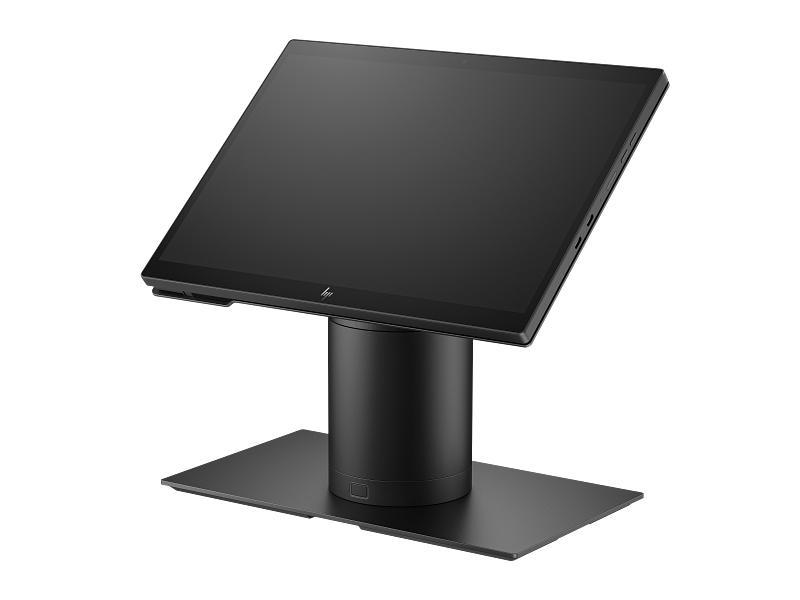
What Are HP Retail Engage Go Tablets?
HP Engage Go is a family of commercial-grade mobile and convertible computing solutions designed for retail, hospitality, and other customer-facing industries.
Unlike conventional consumer tablets, HP Engage Go devices are engineered for business applications, offering durable construction, enterprise security features, flexible connectivity, and support for specialized POS accessories.
The product family includes configurations such as the HP Engage Go 10 and HP Engage Go 13.5-inch Mobile System.
Depending on the model and configuration, employees can use the tablet as a mobile workstation or place it into a compatible dock for a more traditional countertop POS experience.
This flexibility gives businesses the ability to adapt their technology to different operational requirements without relying entirely on fixed checkout stations.
Key Features of HP Retail Engage Go Tablets
HP Engage Go systems provide a combination of mobility, performance, and business-focused functionality.
Important features include:
- Convertible mobile and countertop POS configurations
- Commercial-grade touchscreen displays
- Windows operating system support on available configurations
- Intel Core processor options
- Long-lasting batteries and HP Fast Charge technology
- Wi-Fi and optional cellular connectivity
- Optional integrated barcode scanning
- Compatible payment terminal accessories
- Enterprise security features
- Durable construction for demanding business environments
- Optional docking stations and peripheral accessories
Actual specifications and available accessories depend on the HP Engage Go model and configuration selected.
1. Move Beyond Traditional Checkout Counters
One of the greatest benefits of HP Retail Engage Go Tablets is their flexibility.
Traditional POS systems generally require employees to complete transactions from a fixed register.
While these systems remain useful, they may limit employees’ ability to assist customers throughout a store.
HP Engage Go tablets help businesses introduce mobile workflows that allow employees to move between departments, assist customers, and access business applications without constantly returning to a checkout station.
For example, a retail employee can use an Engage Go tablet to check product availability, review inventory information, or help a customer locate an item.
With compatible POS software and payment accessories, the same device can support mobile checkout.
This approach creates a more flexible customer service environment.
2. Transform from Mobile Tablet to Fixed POS
One of the most valuable features of HP Engage Go technology is its convertible design.
Rather than choosing exclusively between a mobile tablet and a traditional POS terminal, businesses can use compatible docking solutions to support both operating modes.
An employee can use the device on the sales floor and return it to a docking station when a fixed workstation is needed.
Benefits of this flexibility include:
- Mobile customer assistance
- Fixed counter checkout when needed
- More efficient use of hardware
- Support for changing customer traffic
- Flexible store layouts
- Reduced dependence on dedicated mobile-only devices
For retailers evaluating new POS installations, convertible technology can provide a practical way to support several workflows with the same hardware platform.
3. Improve Customer Service with Mobile POS Technology
Customers increasingly expect fast and personalized assistance.
HP Retail Engage Go Tablets allow employees to access relevant information while interacting directly with customers.
For example, a sales associate in an electronics store can use the tablet to compare product specifications, check available inventory, and assist a customer with purchasing decisions.
In a clothing store, employees can use the device to check sizes and product availability without leaving the sales floor.
For businesses with compatible retail software, these capabilities can help improve employee responsiveness and reduce unnecessary customer waiting.
The result is a shopping experience built around customer convenience rather than the location of a checkout counter.
4. Reduce Checkout Lines During Busy Periods
Long checkout lines can create frustration, particularly during seasonal shopping periods, promotional events, and peak business hours.
HP Engage Go tablets can support mobile checkout and line-busting workflows when paired with compatible POS software and approved payment devices.
Instead of requiring every transaction to be completed at a traditional register, employees can help process purchases from additional locations throughout the store.
This flexibility is especially useful for businesses that experience fluctuating customer traffic.
For example, a retailer might use fixed checkout stations during normal business hours and deploy additional mobile POS devices during peak periods.
This approach allows businesses to adjust checkout capacity without permanently installing additional full-size registers.
5. Designed for Demanding Commercial Environments
Retail and hospitality environments can be challenging for mobile technology.
Devices may be exposed to frequent handling, accidental spills, dust, and continuous daily use.
HP Engage Go tablets are designed with commercial durability in mind.
The Engage Go family includes IP54-rated configurations designed to resist dust and splashing liquids.
The optional rugged case for the HP Engage Go 10 can provide additional protection for selected applications.
These features make HP Engage Go systems more suitable for commercial environments than many conventional consumer tablets.
Businesses should still follow HP’s published handling, cleaning, and operating requirements for their specific model.
6. Enterprise Security and Device Protection
Retail businesses frequently process sensitive operational and customer information.
Protecting business devices and applications is therefore an important consideration when selecting POS hardware.
HP Engage Go systems offer enterprise-focused security technologies, with supported configurations featuring HP Wolf Security for Business.
Depending on the model, available security tools can help protect devices at different levels of the computing environment.
Optional docking and management features can also support physical device security and administrative control.
For organizations managing multiple tablets, selecting supported enterprise security and management capabilities can help simplify device administration.
7. Flexible Connectivity for Modern Retail Operations
Reliable connectivity is essential for mobile POS and business applications.
HP Engage Go tablets support wireless connectivity options designed for commercial deployments.
Depending on the model and configuration, these may include Wi-Fi 6, Bluetooth, and optional cellular connectivity.
For retail employees, wireless access can enable inventory checks, order lookups, customer assistance, and other supported workflows throughout a store.
Cellular-enabled configurations may also benefit suitable off-site or outdoor operations where Wi-Fi connectivity is limited.
Businesses should verify connectivity requirements with their software provider before choosing a configuration.
8. Optional Barcode Scanning and Payment Integration
HP Retail Engage Go Tablets can support specialized accessories that extend their business functionality.
Depending on the configuration, these may include barcode scanning, payment terminals, fingerprint readers, and docking accessories.
Barcode Scanning
Optional integrated barcode scanners allow employees to identify products, verify inventory, and support order fulfillment workflows.
This functionality can be useful for retail product lookup, stockroom activities, and curbside pickup operations.
Payment Processing
Compatible payment accessories allow businesses to use HP Engage Go tablets as part of a mobile payment solution.
For example, HP has offered integrated payment accessory options for the Engage Go 10.
Payment acceptance requires compatible payment software, merchant services, and supported payment hardware.
Important: HP Engage Go is a mobile computing platform; not every tablet configuration includes an integrated payment reader or payment-processing software.
HP Engage Go 10 vs. HP Engage Go 13.5: What’s the Difference?
The HP Engage Go family includes different screen sizes designed for different operational needs.
| Feature | HP Engage Go 10 | HP Engage Go 13.5 |
|---|---|---|
| Display | 10-inch touchscreen | 13.5-inch touchscreen |
| Primary Strength | Compact portability | Larger display area |
| Processor | Intel Core options | Intel Core options |
| Operating System | Windows options | Windows options |
| Barcode Scanning | Optional | Optional |
| Docking | Supported configurations | Supported configurations |
| Mobility | Lightweight handheld use | Larger mobile workstation |
| Typical Applications | Mobile checkout, product lookup | Assisted selling, counter POS, customer engagement |
Both systems can provide a strong foundation for business applications, but the right selection depends on the operating environment.
HP Engage Go 10 is well suited for businesses that prioritize portability and frequent movement throughout the workplace.
HP Engage Go 13.5 provides additional screen space, making it useful for applications where employees need to display detailed product information or interact with more complex software interfaces.
Specific processor, connectivity, operating system, and accessory options vary by model and part number.
HP Retail Engage Go Tablets Across Different Industries
Although HP Engage Go devices are designed with retail in mind, their flexibility makes them useful across several industries.
Retail: Mobile Checkout and Personalized Shopping
Retailers can use HP Engage Go tablets to improve customer engagement and streamline store operations.
Common applications include:
- Mobile checkout and line busting
- Product availability checks
- Customer-assisted selling
- Inventory management
- Online order pickup verification
- Product demonstrations and consultations
For example, a furniture store can use the larger HP Engage Go 13.5 display to help customers compare products and review available configurations.
A clothing retailer may prefer the smaller Engage Go 10 for employees who frequently move throughout the sales floor.
Restaurants and Hospitality: Flexible Guest Service
Restaurants, hotels, and hospitality businesses benefit from technology that supports mobile employee workflows.
HP Engage Go tablets can help employees access reservation systems, review orders, manage guest information, and support compatible payment applications.
Potential applications include:
- Table-side ordering
- Mobile payment workflows
- Hotel guest check-in
- Restaurant counter operations
- Customer service stations
- Event registration
With compatible software, employees can bring essential business functions directly to customers.
Healthcare: Mobile Information Access
Healthcare organizations increasingly rely on mobile computing to support administrative and operational workflows.
HP Engage Go devices can support suitable applications such as patient registration, information access, equipment tracking, and mobile administrative workstations.
Commercial durability and supported cleaning procedures can be important considerations in healthcare environments.
Healthcare organizations should verify their selected model, software, and accessories meet applicable data-security, infection-control, and operational requirements.
Warehousing and Inventory Operations
Retail warehouses and distribution facilities can also benefit from mobile computing.
Scanner-equipped HP Engage Go configurations may support inventory lookup, product identification, order verification, and other suitable workflows.
Their touchscreen interfaces provide a flexible platform for employees who need to access business applications away from traditional desks.
9. Support Business Growth with Flexible Technology
As businesses expand, their technology requirements often change.
A small retailer may begin with a single checkout station but eventually need additional mobile devices, inventory tools, and customer service workstations.
HP Engage Go technology supports these changing requirements by offering convertible hardware and a range of compatible accessories.
Businesses can plan deployments that combine fixed checkout, mobile customer assistance, and operational applications.
This flexibility can help organizations create a more adaptable technology environment.
10. Improve Operational Efficiency Without Sacrificing Mobility
The value of HP Retail Engage Go Tablets extends beyond portability.
By giving employees access to essential business applications throughout the workplace, organizations can reduce unnecessary movement between customer service areas and fixed workstations.
For example, retail associates may be able to answer customer questions without returning to a back-office computer.
Restaurant employees may access orders and service information directly from the floor.
Warehouse employees may review inventory records while working near products.
These improvements depend on appropriate software integration, but they illustrate how mobile computing can support more efficient business operations.
Why Purchase HP Engage Go Tablets from PLS?
At PLS, we understand that selecting the right retail technology requires careful consideration of your business applications, hardware requirements, and operating environment.
PLS helps businesses evaluate HP Retail POS systems, mobile computing solutions, barcode scanners, receipt printers, and related technology.
Our team can assist with:
- HP Engage Go tablet selection
- Mobile and fixed POS hardware requirements
- Compatible barcode scanning options
- POS peripherals and accessories
- Multi-location equipment planning
- Business-specific hardware configurations
Whether you’re opening a new retail store, upgrading existing POS equipment, or introducing mobile checkout technology, PLS can help you identify suitable solutions.
Modernize Your Retail Operations with HP Engage Go
The benefits of HP Retail Engage Go Tablets go beyond traditional POS functionality.
By combining portable computing, commercial durability, enterprise security, and convertible deployment options, HP Engage Go devices give businesses greater flexibility in how they serve customers and manage operations.
From retail checkout and inventory management to hospitality and customer service, HP Engage Go tablets offer a versatile technology platform designed for modern business environments.
Ready to bring mobility and flexibility to your POS operations?
Explore business technology solutions at PLS or contact the PLS team for assistance selecting the right HP Engage Go configuration.
Empower your employees. Improve customer experiences. Modernize your business with HP Engage Go and PLS.

Leave A Comment